


Disclosure: This article may contain affiliate links. If you purchase through one of these links, we may earn a commission at no extra cost to you. Our recommendations are based on practical usefulness, not commission rates.
Learning artificial intelligence no longer requires programming experience or an expensive software subscription. Many popular AI platforms now provide free access that is useful for learning, writing, research, design, and everyday organization.
The best free AI tools for beginners have simple interfaces, clear use cases, and enough free access to help a new user practice before paying. However, “free” usually comes with limits such as fewer daily requests, restricted models, reduced storage, or locked advanced features.
This guide compares seven beginner-friendly AI tools available in 2026, explains what each one does well, and provides practical prompts you can use immediately.
Best Free AI Tools for Beginners: Quick Answer
- ChatGPT: Best overall for learning, writing, brainstorming, and everyday assistance
- Google Gemini: Best for users already working with Google services
- Canva AI: Best for presentations, social posts, and visual design
- Grammarly: Best for checking English grammar, spelling, and clarity
- QuillBot: Best for rewriting and summarizing text
- Perplexity: Best for source-linked AI research
- Notion AI: Best for organizing notes and projects, with limited AI access
Comparison: Best Free AI Tools in 2026
| Tool | Best for | Free access | Main limitation |
|---|---|---|---|
| ChatGPT | General assistance | Free plan | Usage, model, and feature limits apply |
| Google Gemini | Learning and Google users | Free access with limits | Advanced models and higher limits require a plan |
| Canva AI | Design and presentations | Free plan with limited AI usage | Premium assets and advanced tools are restricted |
| Grammarly | English writing | Free plan | Advanced rewriting and suggestions require payment |
| QuillBot | Paraphrasing and summaries | Free tools with limits | Word, mode, and feature restrictions apply |
| Perplexity | Research with citations | Free standard searches | Advanced searches and models have tighter limits |
| Notion AI | Notes and project organization | Free workspace; AI access may be limited or trial-based | Ongoing advanced AI use may require a paid plan |
Important: Free-plan features and limits change. Confirm the latest details on the official website before choosing a tool or upgrading.
What Makes an AI Tool Beginner-Friendly?
A beginner-friendly AI tool should be easy to start, useful without technical setup, and clear about its limits. Look for:
- A simple interface and clear instructions
- A useful free plan—not only a short trial
- A specific task it performs well
- Easy ways to edit or export the result
- Privacy controls and understandable terms
- Reliable support or help documentation
Do not choose a tool only because it has many features. The best starting tool is the one that solves a task you already do.
Why Beginners Should Learn AI in 2026
AI Can Support Learning
AI can explain difficult concepts in simpler language, generate practice questions, compare ideas, and provide feedback on a first attempt. It should support learning rather than completing every assignment without understanding.
Free Access Reduces the Risk of Starting
A free plan lets you test whether a tool fits your workflow before paying. Beginners should learn the basics and identify real limitations before considering an upgrade.
AI Is Useful Across Many Types of Work
Students, creators, freelancers, business owners, and office workers can all use AI for everyday tasks. The valuable skill is not simply opening an AI app; it is giving clear context, reviewing the output, and applying sound judgment.
1. ChatGPT — Best Free AI Tool for Beginners Overall
ChatGPT is a general-purpose AI assistant for questions, writing, brainstorming, studying, planning, and many other tasks. OpenAI states that a free version is available to everyone, while paid plans provide additional capabilities and higher access.
Beginners can use ChatGPT to:
- Explain a difficult concept in plain language
- Draft and improve emails
- Practice English conversation and writing
- Generate ideas for articles, videos, or projects
- Create a study plan or quiz
- Organize a task into manageable steps
Beginner ChatGPT Prompt
Explain [topic] to me as a beginner. Use plain language, one simple example, and five short review questions. Do not assume I already understand technical terms.
ChatGPT can make mistakes. Verify important medical, legal, financial, academic, or current information using reliable sources.
If you want to use AI for client work, see our guide to the best AI tools for freelancers in 2026.
2. Google Gemini — Best for Google Users
Google Gemini is an AI assistant that can help with explanations, writing, planning, file-based questions, and other tasks. People who already use a Google account may find the interface familiar.
Gemini can be useful for:
- Summarizing notes or uploaded material
- Generating study questions
- Exploring alternative explanations
- Drafting and organizing ideas
- Working alongside eligible Google services
Google offers paid AI plans with higher limits and additional integrations. Availability can depend on country, age, language, device, and account type.
Beginner Gemini Prompt
Summarize the text below into five key points. Then identify anything that needs verification and create a three-question quiz: [paste text].
3. Canva AI — Best for Beginner Design
Canva AI combines design templates with AI-assisted writing, image creation, presentations, photo editing, and other visual tools. Canva confirms that users can begin with a range of AI features on its Free plan, while higher usage and advanced features require paid plans.
Beginners can create:
- Presentations
- Social media graphics
- Posters and flyers
- Simple videos
- Infographics and visual summaries
Templates are starting points, not finished branding. Change the fonts, colors, images, and wording so the final design fits your purpose. Review AI-generated visuals for errors and usage rights.
Small-business users can explore our comparison of the best AI tools for small businesses in 2026.
4. Grammarly — Best for Improving English Writing
Grammarly helps identify spelling, grammar, punctuation, and clarity issues in English writing. It can work across supported browsers and applications.
The free plan is useful for everyday messages, emails, and short documents. More advanced suggestions and generative features may require a paid plan.
Beginner workflow: Write your message yourself, use Grammarly to identify problems, and read every suggestion before accepting it. A correction can be grammatically valid while changing your intended meaning.
5. QuillBot — Best for Rewriting and Summarizing
QuillBot provides paraphrasing, summarizing, grammar, and other writing tools. The free options can help beginners explore alternative wording or shorten a long passage, although limits apply.
Use QuillBot to improve text you understand—not to disguise copied work. Review the rewritten version for accuracy, citations, tone, and plagiarism requirements.
Safe Rewriting Instruction
Rewrite this paragraph in clearer English without changing its facts, technical terms, names, numbers, or citations. Keep the tone professional: [paste paragraph].
6. Perplexity — Best for Source-Linked Research
Perplexity is an AI-powered answer and research tool that provides links to sources. Its free access can help beginners find starting material and understand a topic more quickly.
A citation does not automatically prove that an answer is correct. Open the cited page, confirm that it supports the exact claim, check the date, and prefer primary or authoritative sources.
Beginner Research Prompt
Explain [topic] for a beginner. Use current primary sources, separate confirmed facts from uncertainty, and provide direct links supporting each major claim.
7. Notion AI — Best for Notes and Organization
Notion is a workspace for notes, databases, tasks, and projects. Its AI features can help summarize pages, organize ideas, and develop first drafts.
The workspace itself has free options, but ongoing AI access can be limited, trial-based, or dependent on the current plan. Check the pricing page before relying on it as a permanently free AI service.
A beginner can create a simple dashboard containing:
- Daily tasks
- Study or work notes
- Project deadlines
- Ideas to develop later
- A weekly review section
A Safe Five-Step AI Workflow for Beginners
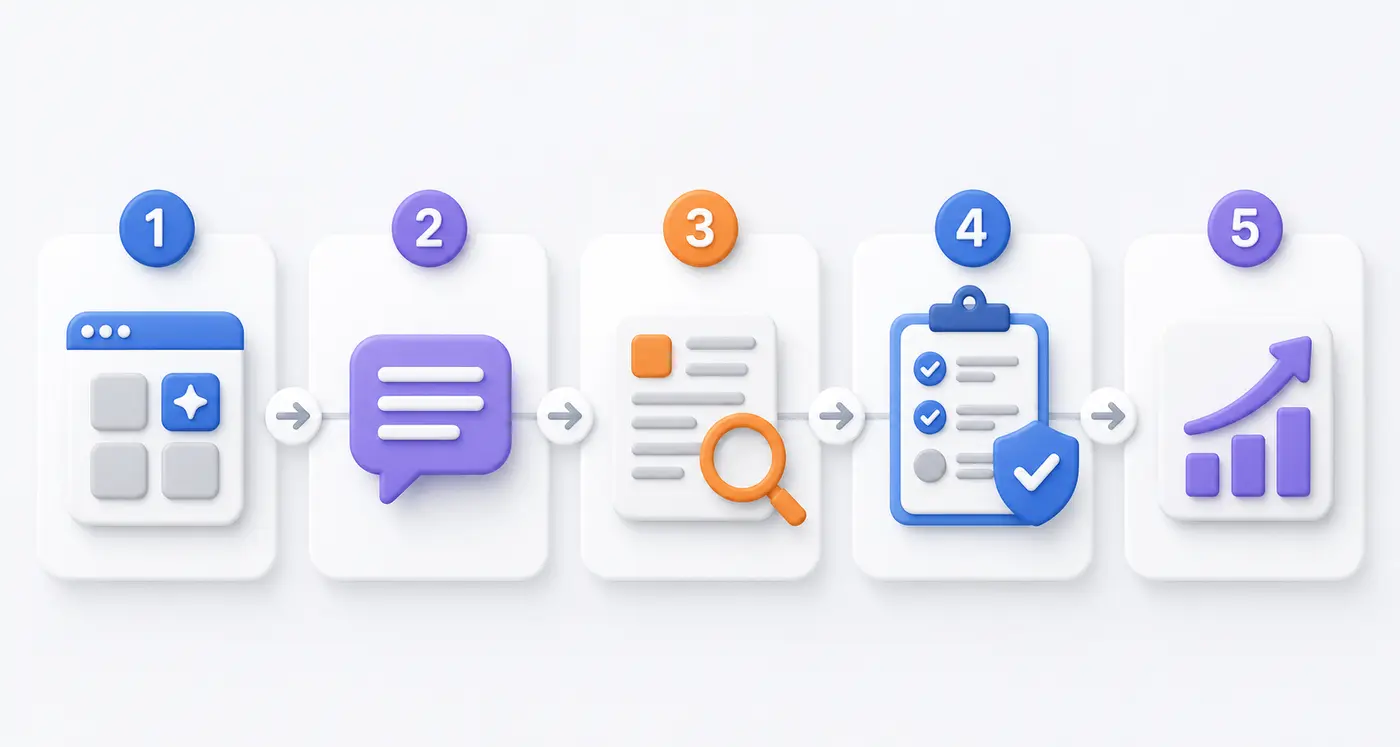
Choose one tool, write a clear prompt, review the answer, verify important facts, and apply the result.
- Choose one tool: Start with the tool that matches your immediate task.
- Write a clear prompt: Include your goal, audience, context, and desired format.
- Review the output: Look for errors, missing context, and unnatural wording.
- Verify important claims: Use reliable sources instead of trusting the answer automatically.
- Apply your judgment: Edit the result and take responsibility for the final work.
How to Combine Free AI Tools
You do not need to use every tool. A simple workflow may be:
- For a presentation: Perplexity for sources → ChatGPT for an outline → Canva for slides → Grammarly for final language
- For studying: Gemini or ChatGPT for explanations → Notion for notes → self-testing without AI
- For an article: Perplexity for source discovery → ChatGPT for structure → Grammarly for editing → human fact-check
Do not upload passwords, payment details, private company files, confidential client information, medical records, or other sensitive data unless you understand the tool’s privacy controls and have permission.
Common Beginner Mistakes
Copying AI Output Without Review
AI-generated text can contain false facts, outdated information, weak reasoning, or unnatural language. Treat every output as a draft.
Using Too Many Tools at Once
Tool collecting is not the same as learning. Start with one assistant and one specialist tool, then add another only when a real need appears.
Paying Before Understanding the Free Plan
Use the free version long enough to identify which limitation is affecting your work. Upgrade only when the paid feature saves enough time or improves a meaningful outcome.
Sharing Sensitive Information
Remove personal and confidential details before entering content into an AI tool. Review privacy settings and organizational policies.
Using AI Instead of Learning
Ask AI to explain, quiz, critique, or guide you. If it completes every task for you, your output may improve temporarily while your own skill does not.
Frequently Asked Questions
What is the best free AI tool for a complete beginner?
ChatGPT is a flexible starting point because it supports many everyday tasks through a conversational interface. Canva is a better first choice if your primary goal is visual design.
Are free AI tools completely free?
Usually not without limits. A free plan may restrict daily usage, models, uploads, storage, exports, or advanced features. Always check the current pricing page.
Can students use free AI tools?
Yes, but students should follow school rules, cite sources correctly, protect private information, and use AI to support understanding rather than submit unreviewed generated work.
Can AI tools provide incorrect information?
Yes. AI systems can generate confident but inaccurate answers. Verify important information using reliable, current sources.
Do beginners need programming skills to use AI?
No. The tools in this guide use conversational or visual interfaces. Programming becomes useful for advanced automation and development, but it is not required to start.
Final Verdict
The best free AI tools for beginners in 2026 cover different needs. ChatGPT and Gemini are flexible assistants, Canva supports visual creation, Grammarly improves English writing, QuillBot helps rewrite and summarize, Perplexity supports source-linked research, and Notion organizes notes and projects.
Start with one tool and one real task. Learn to write clear prompts, review outputs, verify facts, and protect sensitive information. Upgrade only after the free plan’s limits genuinely interfere with useful work.
AI can help you learn and work more efficiently, but the final responsibility for accuracy, originality, and judgment remains yours.