


Disclosure: This article may contain affiliate links. If you purchase through one of these links, we may earn a commission at no extra cost to you. Our recommendations are based on practical usefulness, not commission rates.
Creating consistently on Instagram in 2026 involves much more than taking a photo and writing a short caption. Creators may need to research ideas, script Reels, design carousels, edit video, generate captions, schedule posts, and review performance—often across several formats every week.
The right AI tools for Instagram creators can reduce repetitive work and help turn a rough idea into a publishable asset. They cannot guarantee reach, followers, or engagement, and they should not replace the creator’s judgment, experience, or relationship with the audience.
This guide compares ten practical tools for Instagram captions, visual design, Reels, voiceovers, planning, scheduling, and analytics. It also explains how to use them without producing generic or misleading content.
Best AI Tools for Instagram Creators: Quick Answer
- ChatGPT: Best for ideas, captions, hooks, and content planning
- Canva AI: Best for carousels, Stories, covers, and branded graphics
- CapCut: Best beginner-friendly editor for short-form video
- ElevenLabs: Best for AI voiceovers and multilingual narration
- Midjourney: Best for stylized AI image creation
- Hootsuite: Best for teams managing several social networks
- Later: Best for visual planning and creator-focused scheduling
- Description: Best for talking-head and educational video editing
- Flick: Best for Instagram-focused writing and planning assistance
- Notion AI: Best for organizing content calendars and brand work
Comparison: Best Instagram AI Tools in 2026
| Tool | Best for | Main strength | Main limitation |
|---|---|---|---|
| ChatGPT | Ideas and writing | Flexible brainstorming and editing | Requires verification and personal editing |
| Canva AI | Visual design | Templates plus AI-assisted creation | Unedited templates can look generic |
| CapCut | Reels editing | Accessible mobile video workflow | Some features and assets are paid |
| ElevenLabs | Voiceovers | Natural-sounding speech generation | Voice rights and disclosure require care |
| Midjourney | AI images | Strong stylized visual generation | Needs prompting skills and rights review |
| Hootsuite | Multi-platform teams | Scheduling and analytics in one system | May be excessive for one small account |
| Later | Visual planning | Creator-oriented calendar and publishing | Advanced features depend on the plan |
| Descript | Talking-head video | Edit video through its transcript | Automatic edits still need review |
| Flick | Instagram workflow | Ideas, writing, and planning assistance | Cannot guarantee reach through hashtags |
| Notion AI | Organization | Flexible database for the entire pipeline | Not a direct publishing platform |
Important: Features, free-plan limits, and pricing change regularly. Confirm current details on each provider’s official website before paying.
Why Instagram Creators Use AI Tools in 2026
Faster Production
AI can speed up first drafts, transcription, captioning, background removal, resizing, and repurposing. The real benefit is reducing routine production time—not automatically creating a successful post.
A More Reliable Content System
Consistency becomes easier when ideas, drafts, designs, and publishing dates are organized. However, publishing more often is useful only when the content remains relevant and recognizable.
More Formats From One Strong Idea
A creator can turn one useful lesson into a Reel script, carousel outline, story sequence, caption, and email. Repurposing should adapt the message to each format rather than copying the same text everywhere.
Faceless Content Without Inventing Expertise
AI voice, generated images, screen recordings, animation, and stock footage can support faceless accounts. The creator is still responsible for accuracy, rights, disclosure, and delivering original value.
1. ChatGPT — Best for Instagram Ideas, Hooks, and Captions
ChatGPT can help brainstorm content pillars, outline Reels, develop carousel structures, rewrite captions, and create variations for testing. OpenAI recommends treating ChatGPT as a thought partner and applying human judgment before final publication.
Useful tasks include:
- Generating Reel concepts from a real audience problem
- Writing several opening hooks for one topic
- Turning a long article into a carousel outline
- Improving caption clarity while preserving the creator’s meaning
- Building a weekly content calendar around defined content pillars
Example Instagram Prompt
Turn the notes below into a 30-second Instagram Reel script for beginner freelancers. Write a specific opening hook, three short teaching points, and a natural call to action. Keep my facts unchanged, do not invent personal results, and avoid exaggerated promises: [paste your notes].
ChatGPT can suggest hashtags, but suggestions are not proof that a hashtag is current, safe, or effective. Review them directly on Instagram before publishing.
Creators working across platforms can also explore our guide to the best AI tools for content creators in 2026.
2. Canva AI — Best for Carousels, Stories, and Covers
Canva combines customizable Instagram templates with AI-assisted writing, image generation, photo editing, resizing, and brand tools. It is practical for carousel slides, story designs, reel covers, quote graphics, and simple promotional posts.
To avoid a generic template look:
- Use a consistent brand palette and two readable fonts
- Keep mobile text large and concise
- Use original examples and screenshots where possible
- Maintain enough contrast between text and background
- Export at the dimensions recommended by Instagram
For more general business use cases, see the best AI tools for small businesses in 2026.
3. CapCut — Best Beginner-Friendly Editor for Reels
CapCut provides a mobile and desktop editing workflow for short-form video. Depending on the version and plan, tools may include automatic captions, background removal, templates, effects, audio editing, and resizing.
CapCut is useful for quick social edits, but creators should check caption accuracy, music rights, template licensing, and export quality. Trending effects cannot rescue a Reel that lacks a clear idea.
4. ElevenLabs — Best for AI Voiceovers
ElevenLabs offers AI speech tools that can support narration for educational Reels, product explanations, stories, and faceless content.
Only clone or use a voice when you have the necessary permission. Review pronunciation, pacing, emotion, and language accuracy, and disclose synthetic media when platform rules or the context require it. Never imitate another person deceptively.
5. Midjourney — Best for Stylized AI Images
Midjourney can generate stylized images, conceptual scenes, backgrounds, characters, and visual directions from text prompts.
AI-generated does not automatically mean “copyright free.” Review the tool’s current terms, your plan, local law, and any recognizable brands or people before commercial use. Do not present generated images as documentary evidence of real events.
6. Hootsuite — Best for Multi-Platform Teams
Hootsuite supports social scheduling, team workflows, performance reporting, and management across multiple networks. It is most useful when a business manages Instagram together with LinkedIn, Facebook, or other channels.
Recommended publishing times should be treated as starting points. The most useful schedule comes from comparing your own audience activity, content format, time zone, and results.
7. Later — Best for Visual Content Planning
Later is known for visual planning and social media scheduling. It can help creators organize upcoming posts and maintain a clearer view of the content calendar.
Later is not limited to Instagram. Its platform supports additional social networks, so it may suit creators publishing across several channels. Check the current plan for supported post types, account limits, analytics, and AI features.
8. Descript—Best for Talking-Head and Educational Reels
Descript lets creators edit video and audio through a transcript. It can help remove filler words, improve audio, and generate captions, which makes it practical for interviews, educational clips, and speaking-to-camera videos.
Always review automatic transcripts and cuts. Names, accents, technical terms, and abrupt edits frequently need manual correction.
9. Flick — Best for Instagram-Focused Planning Assistance
Flick provides Instagram-oriented tools for ideas, caption writing, planning, and hashtag research.
Hashtags can provide context and discovery opportunities, but they do not guarantee reach. Use a small set of genuinely relevant terms and prioritize the quality of the post, its opening, watch time, usefulness, and audience response.
10. Notion AI — Best for Organizing the Creator Workflow
Notion AI can support a content database containing ideas, scripts, captions, brand contacts, publishing dates, asset links, and performance notes.
A practical database can include the following:
- Content idea and audience problem
- Format: Reel, Story, carousel, or single image
- Status: idea, drafting, editing, scheduled, or published
- Owner or collaborator
- Publish date and campaign
- Key results and lessons learned
A Simple AI Workflow for Instagram Creators
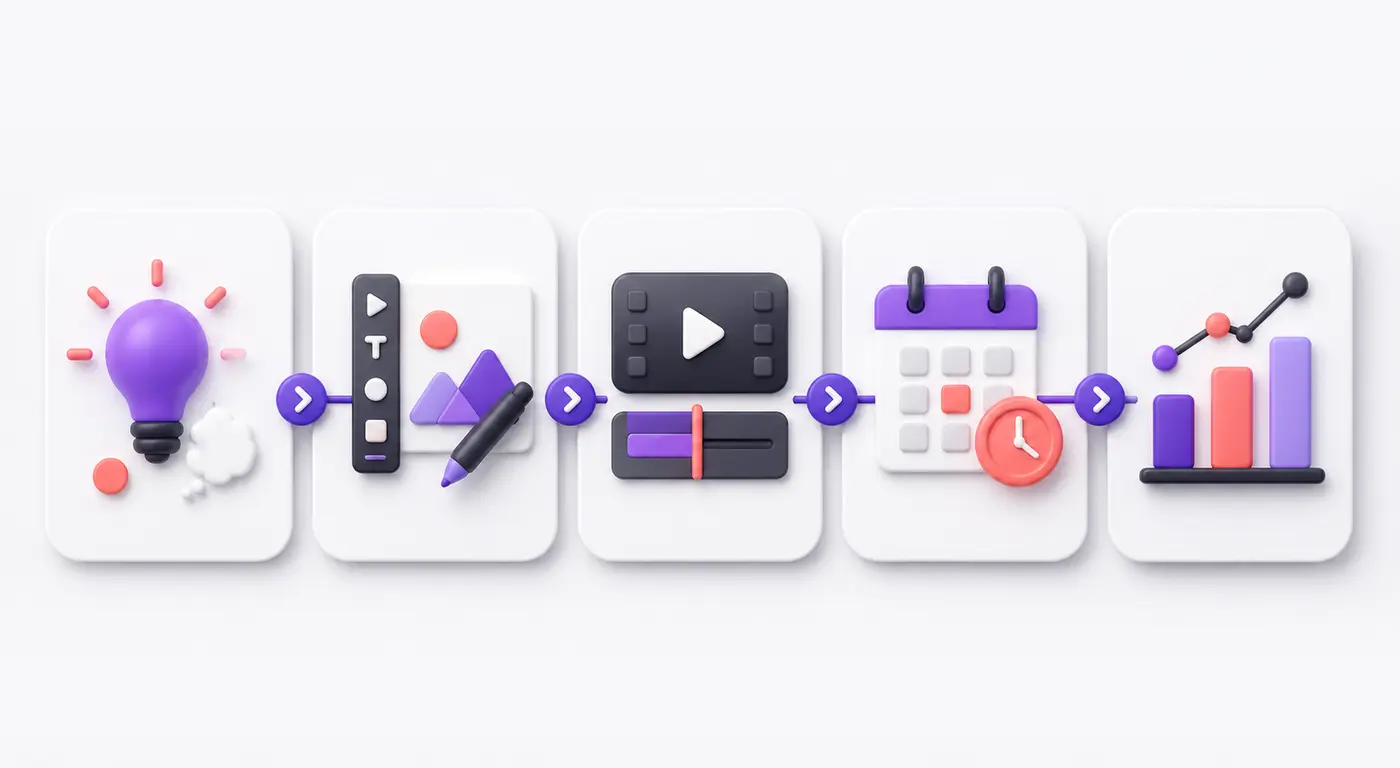
A practical Instagram workflow: develop the idea, create the visual, edit the video, schedule publication, and analyze the result.
- Start with audience insight: Choose a real question, problem, story, or lesson.
- Develop the concept: Use ChatGPT for hooks, outlines, and alternative angles.
- Create the asset: Use Canva or Midjourney for visuals, or record original footage.
- Edit the Reel: Use CapCut or Descript and review captions manually.
- Add narration if needed: Use your own voice or an authorized ElevenLabs voice.
- Schedule carefully: Use Instagram’s native tools, Later, or Hootsuite.
- Review performance: Compare reach, watch time, saves, shares, profile activity, and business results.
AI Content Disclosure and Responsible Use
Instagram provides labels and transparency features for certain AI-generated content. Check current Instagram guidance when a post uses realistic synthetic images, altered media, or AI-generated characters. Transparency protects audience trust and may be required by platform rules.
Creators should also:
- Avoid cloning a person’s face or voice without permission
- Verify factual claims before publishing
- Use paid-partnership labels when required
- Review music, stock, template, and image rights
- Never invent testimonials, results, or events
- Keep human review in every publishing workflow
Frequently Asked Questions
What is the best AI tool for Instagram creators?
ChatGPT is a flexible starting point for ideas and writing; Canva is practical for graphics; and CapCut is accessible for Reels editing. The best choice depends on the slowest part of your current workflow.
Can AI help grow an Instagram account?
AI can improve efficiency, organization, and production quality, but it cannot guarantee followers or reach. Growth also depends on audience relevance, originality, retention, consistency, distribution, and genuine interaction.
Can I make faceless Instagram content with AI?
Yes. Creators can combine authorized voiceovers, generated visuals, animation, screen recordings, captions, and stock footage. The content still needs original value, correct information, appropriate rights, and transparent disclosure.
Do hashtags still matter on Instagram in 2026?
Relevant hashtags can help describe and categorize a post, but they are not a guaranteed growth tactic. Avoid stuffing captions with unrelated or unverified hashtags.
Should beginners pay for all ten tools?
No. Start with ChatGPT, Canva, and CapCut—or free alternatives—and use Instagram’s native publishing and analytics. Pay for another tool only when a recurring workload or business result justifies the cost.
Final Verdict
The best AI tools for Instagram creators in 2026 support specific stages of production. ChatGPT helps develop ideas, Canva creates visual assets, CapCut and Descript edit video, ElevenLabs supports voiceovers, Midjourney generates visual concepts, Later and Hootsuite organize publishing, Flick assists with Instagram planning, and Notion keeps the workflow organized.
You do not need every tool. Begin with a simple system: one writing assistant, one design tool, one video editor, and Instagram’s native scheduling and analytics. Add paid software only when it solves a measurable problem.
AI can make content creation faster, but durable growth still depends on useful ideas, recognizable creative direction, accurate information, and real audience relationships.