


Disclosure: This article may contain affiliate links. If you purchase through one of these links, we may earn a commission at no extra cost to you. Our recommendations are based on practical usefulness, not commission rates.
Creating consistently on TikTok in 2026 requires a steady supply of useful ideas, strong opening moments, clear editing, accurate captions, and an understanding of what keeps viewers watching. Handling every stage manually can take significant time, especially for solo creators and small teams.
The right AI tools for TikTok creators can support brainstorming, script development, video editing, voiceovers, visual design, trend research, and performance analysis. They cannot guarantee views or make weak ideas go viral, and every output still needs human review.
This guide compares seven practical tools and explains how to combine them into a responsible TikTok workflow—from the first idea to reviewing the results.
Best AI Tools for TikTok Creators: Quick Answer
- ChatGPT: Best for ideas, hooks, scripts, and content calendars
- CapCut: Best beginner-friendly editor for TikTok videos
- ElevenLabs: Best for AI voiceovers and multilingual narration
- Pictory: Best for turning scripts and longer content into video drafts
- Canva AI: Best for covers, branded visuals, and simple animations
- TrendTok Analytics: Best for third-party trend discovery
- Descript: Best for talking-head, interview, and story-based videos
Comparison: Best TikTok AI Tools in 2026
| Tool | Best for | Main strength | Main limitation |
|---|---|---|---|
| ChatGPT | Ideas and scripts | Flexible brainstorming and rewriting | Requires fact-checking and personal editing |
| CapCut | Short-form editing | Captions, effects, templates, and mobile workflow | Some features and assets depend on the plan |
| ElevenLabs | Voiceovers | Natural-sounding speech and language options | Voice rights and disclosure require care |
| Pictory | Script-to-video drafts | Combines text, visuals, captions, and editing | Automatic visual choices often need replacement |
| Canva AI | Visual design | Templates and AI-assisted creative tools | Generic templates need customization |
| TrendTok | Trend discovery | Tracks sounds and emerging patterns | Cannot predict or guarantee virality |
| Descript | Talking-head video | Edit video through its transcript | Automatic transcripts and cuts need review |
Important: Features, free-plan limits, and pricing can change. Confirm current details on each provider’s official website before purchasing.
Why TikTok Creators Use AI Tools in 2026
Faster First Drafts
AI can reduce the time spent starting from a blank page. It can organize rough notes, propose alternative hooks, transcribe speech, generate captions, and handle repetitive edits. The creator still decides whether the idea deserves to be published.
A More Consistent Workflow
Consistency becomes easier when creators can capture ideas, prepare scripts in batches, and reuse a repeatable editing process. There is no universal posting frequency that guarantees visibility; quality, audience relevance, and sustainability matter more than forcing an arbitrary number of uploads.
Trend Research With Context
Trend tools can surface popular sounds, formats, and topics. A trend is useful only when it fits the creator’s niche and audience. Copying every popular format usually produces forgettable content.
Faceless Content Options
Authorized AI voices, animation, generated visuals, screen recordings, stock media, and text-led storytelling can support faceless channels. Creators remain responsible for originality, accuracy, rights, and platform disclosure.
1. ChatGPT — Best for TikTok Ideas, Hooks, and Scripts
ChatGPT can help creators brainstorm topic angles, turn expertise into short scripts, generate several opening hooks, improve captions, and organize a weekly content plan. OpenAI describes ChatGPT as a structured thought partner that can turn rough concepts into clearer first drafts.
Useful TikTok tasks include:
- Creating video ideas from real audience questions
- Writing concise scripts for educational videos
- Generating alternative hooks without changing the core claim
- Repurposing a blog post, podcast, or long video into short concepts
- Building content pillars and a realistic publishing calendar
Example TikTok Script Prompt
Turn my notes into a 30-second TikTok script for beginner small-business owners. Start with a specific hook, explain three practical points, and finish with a natural call to action. Keep my facts unchanged, do not invent results, and avoid exaggerated promises: [paste your notes].
Do not publish the first AI draft unchanged. Add your real example, verify every claim, and replace language that does not sound natural to you.
For a wider creator toolkit, read our guide to the best AI tools for content creators in 2026.
2. CapCut — Best for Editing TikTok Videos
CapCut provides mobile, desktop, and browser-based tools for short-form video editing. Depending on the version and plan, its features can include automatic captions, text-to-speech, background removal, templates, effects, color tools, and direct sharing workflows.
CapCut is practical for beginners because the interface is designed around quick video production. However, creators should check caption accuracy, music rights, template licensing, and export quality. Effects and transitions should support the message rather than distract from it.
Best CapCut Workflow
- Import original footage.
- Remove weak pauses and unnecessary clips.
- Add captions and correct every word manually.
- Use B-roll or graphics only where they improve understanding.
- Review audio, framing, and mobile readability before export.
3. ElevenLabs — Best for AI TikTok Voiceovers
ElevenLabs provides AI speech tools for narration, multilingual content, and faceless video workflows. It can be useful for educational explainers, stories, product demonstrations, and information-led videos.
Only clone or use a person’s voice when you have permission. Review pronunciation, pacing, tone, and language accuracy, and disclose synthetic media when platform rules or the context require it. Never use a cloned voice to impersonate someone deceptively.
4. Pictory — Best for Turning Scripts Into Video Drafts
Pictory can help turn scripts, articles, or longer recordings into shorter video drafts with visuals, captions, and editing assistance.
It can be useful for tips, list-style explainers, narrated educational content, and repurposing. Automatic visual matching is not always accurate or original enough, so replace irrelevant stock footage and check that every scene supports the narration.
Creators comparing broader AI options can also review the best AI tools for freelancers in 2026.
5. Canva AI — Best for TikTok Covers and Visual Assets
Canva combines templates, simple animation, image editing, text tools, and AI-assisted creation. TikTok creators can use it for video covers, list graphics, branded backgrounds, quote videos, Story-style layouts, and supporting visual elements.
Customize templates with a consistent palette, readable fonts, and original information. Keep important text within safe mobile areas and preview it at phone size before exporting.
6. TrendTok Analytics — Best for Third-Party Trend Discovery
TrendTok Analytics is a mobile app designed to help creators discover and monitor social media sounds and trends. It may help identify emerging formats earlier than manual browsing.
TrendTok cannot guarantee that a sound or format will make a video viral. Validate any trend inside TikTok, confirm that it is still active, and adapt it to a relevant idea rather than copying it unchanged.
Creators can also use the official TikTok Creative Center to explore platform trends and TikTok Studio to manage and analyze content performance.
7. Descript — Best for Talking-Head and Story Videos
Descript lets creators edit video and audio through a transcript. It can remove filler words, improve audio, and generate captions, making it useful for interviews, educational TikToks, commentary, and story-driven content.
Automatic transcripts can mishear names, accents, and technical terms. Review every caption and watch the full export for awkward cuts before publishing.
A Simple AI Workflow for TikTok Creators
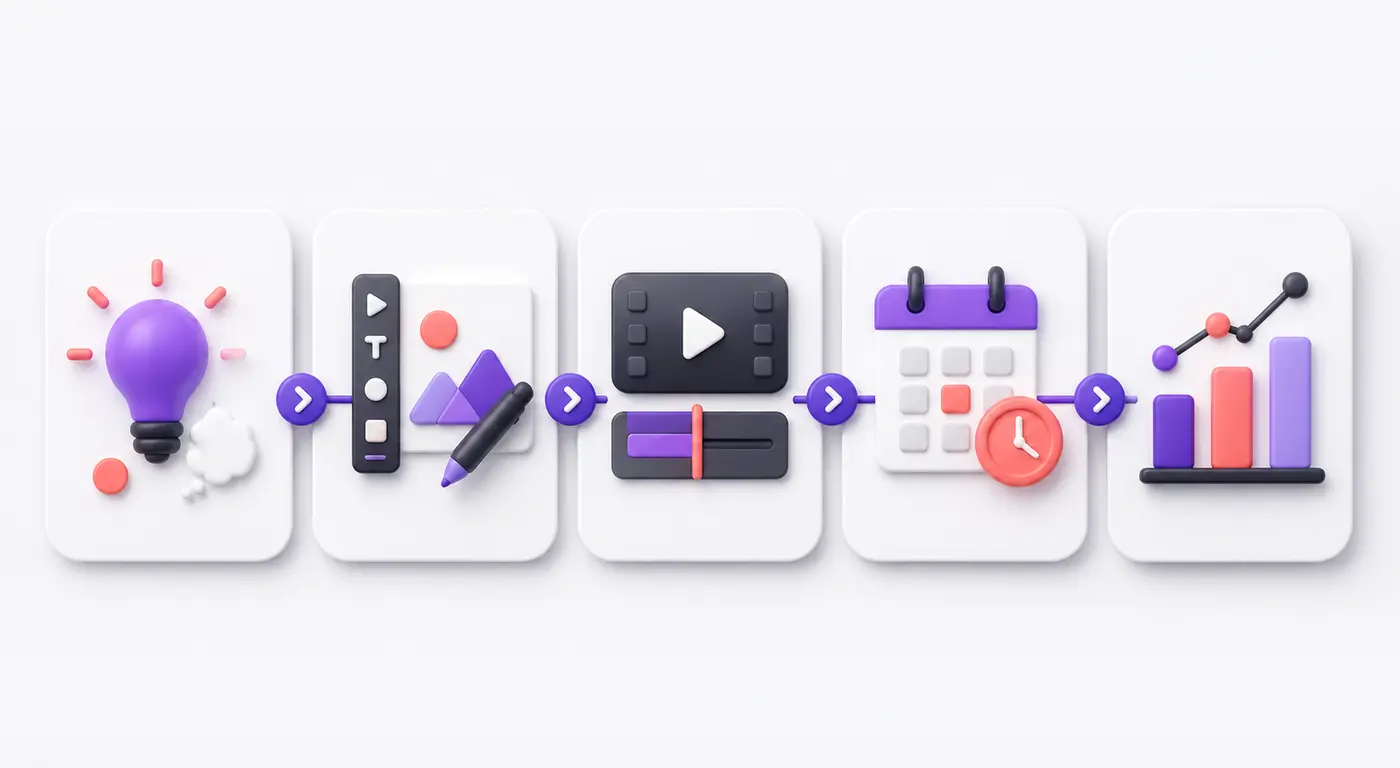
A practical TikTok workflow: develop the idea, prepare the script or voice, edit the video, check relevant trends, and analyze the result.
- Start with a real audience need: Choose a question, problem, experience, or useful lesson.
- Develop the script: Use ChatGPT for hooks and structure, then add your expertise.
- Record or build the video: Use original footage, Pictory, Canva, or authorized media.
- Edit and caption: Use CapCut or Descript and review all automatic edits.
- Add narration if needed: Use your own voice or an authorized ElevenLabs voice.
- Check trends: Use TrendTok or TikTok Creative Center only when the trend fits the message.
- Publish and measure: Review watch time, completion, shares, saves, comments, profile activity, and relevant business outcomes.
AI Disclosure and Responsible TikTok Content
TikTok has guidance and labeling requirements for certain AI-generated or significantly edited content. Review the current rules when a post contains realistic synthetic people, cloned voices, or altered scenes. Transparent labeling protects audience trust and may be required by the platform.
- Do not clone another person’s face or voice without permission.
- Verify facts, names, statistics, and product claims.
- Review music, stock footage, templates, and image rights.
- Do not invent testimonials, events, or personal results.
- Disclose sponsorships and paid partnerships when required.
- Keep human review in every publishing workflow.
Frequently Asked Questions
What is the best AI tool for TikTok creators?
ChatGPT is a flexible starting option for ideas and scripts, while CapCut is practical for short-form editing. The best tool depends on whether your main bottleneck is planning, editing, voice, visuals, or trend research.
Can AI make a TikTok video go viral?
No tool can guarantee virality. AI can improve speed and production, but distribution also depends on audience relevance, viewer retention, originality, timing, competition, and other platform signals.
Can I create faceless TikTok videos with AI?
Yes. A creator can combine authorized voiceovers, generated visuals, screen recordings, captions, animation, and licensed stock footage. Faceless content still requires original value, accurate information, proper rights, and disclosure.
Do I need to post three times per week?
There is no universal posting number that guarantees visibility. Choose a schedule you can maintain without reducing quality, then use your own analytics to test what works for your audience.
Should beginners pay for all seven tools?
No. Start with ChatGPT, CapCut, and TikTok’s native creator tools. Add a paid voice, video, or trend platform only when a recurring workload or measurable business need justifies the cost.
Final Verdict
The best AI tools for TikTok creators in 2026 solve different production problems. ChatGPT supports ideas and scripts, CapCut and Descript simplify editing, ElevenLabs provides authorized voiceovers, Pictory helps build video drafts, Canva creates visual assets, and TrendTok assists with trend discovery.
You do not need all seven tools. Begin with one planning assistant and one video editor, then use TikTok Studio and native analytics to learn from real results. Add specialist tools only when they solve a clear bottleneck.
AI can make content creation more efficient, but sustainable growth still depends on useful ideas, strong storytelling, accurate information, and genuine audience relationships.